

Journal Entries: A Practical Guide to Recording Transactions
Journal entries: a practical guide to recording financial transactions and preparing reports
Journal entries are the foundation on which every business builds its financial records. Every sale, purchase, expense, collection, payment or inventory movement needs to be recorded in an organized way that shows the debit side, the credit side, the amount and the date.
Without accurate journal entries, it is hard to prepare financial statements, track profit and loss, know your financial position or audit your accounts properly. That is why journal entries are an essential step in organizing the finances of companies, stores, restaurants and all kinds of businesses.
In this guide, we explain what journal entries are, their types, how to record them, practical examples, how they relate to financial statements, and how Kashierapp helps you organize sales, invoices and financial reports from one place.
Contents
What are journal entries?
Why are journal entries important?
The elements of a journal entry
The difference between debit and credit
Types of journal entries
Practical examples of journal entries
Steps for preparing a journal entry
How journal entries relate to the general journal and the general ledger
The role of journal entries in preparing financial statements
Common mistakes when recording journal entries
How does Kashierapp help organize your financial operations?
FAQ about journal entries
What are journal entries?
Journal entries are how financial transactions are recorded in a business's accounting records. Every journal entry is based on the double-entry principle: each financial transaction affects at least two accounts, a debit account and a credit account.
Put simply, a journal entry answers three important questions:
What financial transaction took place?
Which account increased or decreased?
Which corresponding account was affected by the same amount?
A simple example: if the business sells a product for cash, cash increases and sales increase. The transaction is therefore recorded as an entry that shows its effect on the accounts.
The importance of these entries becomes clear when preparing financial reports such as the income statement, the balance sheet and the trial balance, because they are the primary source of financial data.
Why are journal entries important?
Journal entries are not just an administrative task; they are the backbone of a business's financial system. The more accurate and organized your entries, the clearer your financial reports and the easier your decisions.
Journal entries matter for several reasons:
They create a clear financial record of every transaction in the business.
They organize sales, purchases and expenses.
They make preparing financial statements easier.
They reduce the errors caused by haphazard manual recording.
They support internal financial control.
They help management see profit and loss.
They make account reviews and audits easier.
They provide accurate data for the accountant or finance team.
They support compliance with approved accounting standards and policies.
If your business depends on daily sales, invoices, inventory or more than one branch, organizing your entries and financial data becomes even more important, because a small recording error can affect your final reports.
The elements of a journal entry
Every correct journal entry must contain a set of basic elements that make the transaction easy to understand and trace later.
1. Entry date
The date the financial transaction took place or was recorded in the system.
2. Debit account
The account that is charged with the transaction amount, depending on the nature of the account and the transaction.
3. Credit account
The corresponding account in which the amount is recorded to complete the effect of the transaction.
4. Entry amount
The monetary value of the transaction. Total debits must equal total credits.
5. Entry description
A short explanation of the reason for the entry, such as a cash sale, a purchase of goods, an expense payment, a collection from a customer or the closing of an account.
6. Supporting document
This may be a sales invoice, purchase invoice, receipt voucher, payment voucher, account statement or any document that proves the transaction.
Having these elements makes the entry auditable and helps the accountant or auditor understand the transaction easily.
The difference between debit and credit
To understand journal entries, you first need to understand what debit and credit mean. “Debit” doesn't always mean someone owes money, and “credit” doesn't always mean someone is owed money. In accounting, debit and credit are simply the two sides on which a transaction is recorded.
The basic rule is that every journal entry must balance:
Total debits = Total credits
Simple examples
When cash increases, cash is recorded on the debit side.
When sales increase, sales are recorded on the credit side.
When expenses increase, the expense is recorded on the debit side.
When liabilities increase, the liability is recorded on the credit side.
Understanding this rule helps you read entries correctly and see how each transaction affects your accounts.
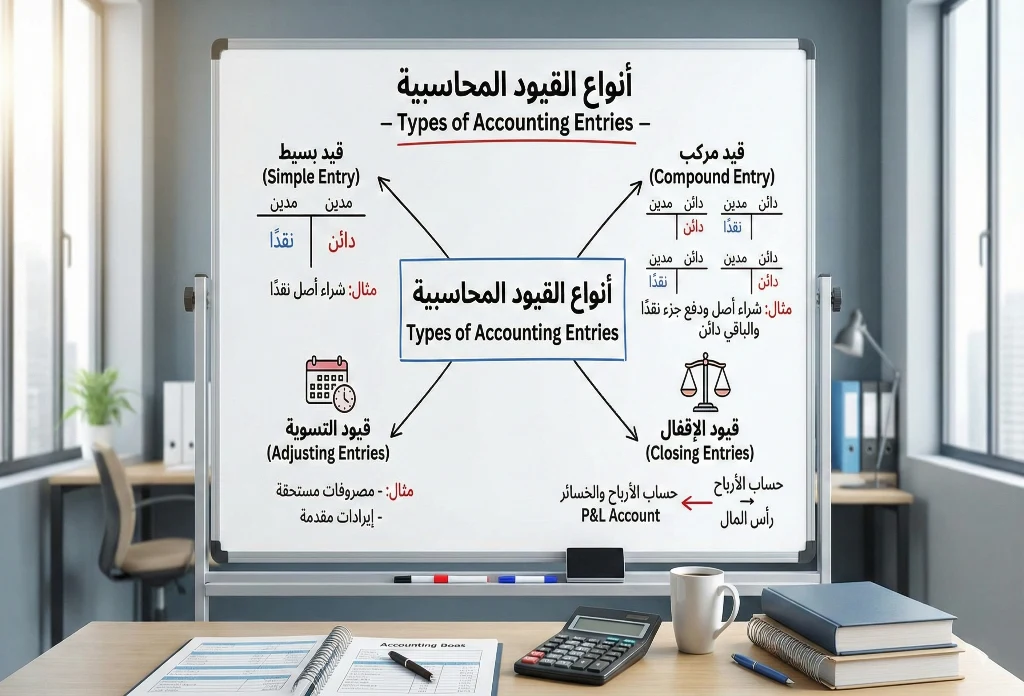
Types of journal entries
Journal entries differ according to when they are recorded and what they are for. Here are the main types used in business.
1. Daily entries
Daily entries are recorded as financial transactions happen each day. They are the most commonly used type, because they record core transactions such as sales, purchases, expenses, collections and payments.
Example of a cash sale entry:
| Account | Debit | Credit |
|---|---|---|
| Cash | 1,000 | - |
| Sales | - | 1,000 |
This entry means cash increased by SAR 1,000, and sales of the same amount were recorded against it.
2. Adjusting entries
Adjusting entries are usually recorded at the end of the financial period to correct or complete transactions that were not fully recorded during the period.
Examples include:
Recording accrued expenses.
Recording accrued revenue.
Adjusting prepaid expenses.
Adjusting unearned (prepaid) revenue.
Recording depreciation.
Correcting earlier errors.
These entries matter because they help present the financial statements more accurately.
3. Closing entries
Closing entries are recorded at the end of the financial period to close temporary accounts, such as revenue and expenses, and transfer the net profit or loss to equity or retained earnings, depending on the type of business.
The purpose of closing entries is to prepare the accounts for the start of a new financial period.
4. Opening entries
Opening entries are recorded at the start of the financial period and reflect the balances of assets, liabilities and equity carried forward from the previous period.
These entries help you start the new financial year with a correct opening balance.
5. Reversing entries
Reversing entries are typically used to reverse certain adjusting entries at the start of the next period, so the same transaction isn't recorded twice.
For example: reversing an accrued expense entry when the actual invoice is recorded later.

Practical examples of journal entries
Practical examples help you understand journal entries faster than theory. Here are simplified examples of common entries in business.
Example 1: Cash sale
If the business sells products worth SAR 2,000 in cash, the entry is:
| Account | Debit | Credit |
|---|---|---|
| Cash | 2,000 | - |
| Sales | - | 2,000 |
In this example, cash increased and sales increased.
Example 2: Credit sale to a customer
If the business sells products worth SAR 3,000 on credit, the entry is:
| Account | Debit | Credit |
|---|---|---|
| Customers (accounts receivable) | 3,000 | - |
| Sales | - | 3,000 |
Here the amount was not collected in cash, so it is recorded in the customers account.
Example 3: Cash purchase of goods
If the business buys goods worth SAR 1,500 in cash, the entry is:
| Account | Debit | Credit |
|---|---|---|
| Purchases or inventory | 1,500 | - |
| Cash | - | 1,500 |
This entry shows that inventory or purchases increased, while cash decreased.
Example 4: Paying rent
If the business pays rent of SAR 4,000, the entry is:
| Account | Debit | Credit |
|---|---|---|
| Rent expense | 4,000 | - |
| Cash or bank | - | 4,000 |
The expense increased, and cash or bank decreased by the same amount.
Example 5: Collecting from a customer
If the business collects SAR 2,500 from a customer with an outstanding balance, the entry is:
| Account | Debit | Credit |
|---|---|---|
| Cash or bank | 2,500 | - |
| Customers (accounts receivable) | - | 2,500 |
Here cash or bank increased, and the customer's balance decreased.
Steps for preparing a journal entry
Preparing a journal entry takes clear steps to make sure the transaction is recorded correctly.
1. Identify the type of transaction
Start by identifying what kind of transaction it is: a sale, purchase, expense, collection, payment, discount, return or settlement.
2. Identify the accounts affected
Determine which accounts the transaction affected. Was cash affected? Sales? Inventory? Customers? Suppliers? Expenses?
3. Determine the debit side and the credit side
Once you know the accounts, decide which account will be debited and which will be credited, based on the nature of the transaction.
4. Determine the transaction amount
Confirm the transaction amount and its supporting document, such as the invoice, receipt voucher or payment voucher.
5. Write a clear description for the entry
The description helps you understand the reason for the entry later, during review or audit.
6. Check that the entry balances
Total debits must equal total credits. If the entry doesn't balance, there is an error that needs to be reviewed.
How journal entries relate to the general journal and the general ledger
The accounting process usually goes through several stages: recording the entry in the general journal, posting it to the general ledger, and then using the balances to prepare the trial balance and financial statements.
The general journal
The general journal is the record in which financial transactions are entered in chronological order. Each transaction is recorded as an entry showing the date, accounts, amount and description.
The general ledger
The general ledger is the record in which transactions are grouped by account. Instead of searching the journal for every sale, you can review the sales account in the ledger to see all its movements.
The trial balance
After entries are posted to the ledger, a trial balance is prepared to confirm that the account balances are in balance, and this data is then used to prepare the financial statements.
The role of journal entries in preparing financial statements
Financial statements depend directly on the journal entries recorded during the period. The more accurate and organized your entries, the more reliable your financial statements.

The income statement
The income statement relies on revenue and expense entries to determine net profit or loss for the period.
For example:
Sales entries affect revenue.
Expense entries affect operating costs.
Discount and return entries affect net sales.
The balance sheet
The balance sheet relies on entries for assets, liabilities and equity. It shows the business's financial position on a specific date.
Examples of accounts that appear on the balance sheet:
Cash.
Bank.
Customers (accounts receivable).
Inventory.
Suppliers (accounts payable).
Loans.
Capital.
Retained earnings.
The cash flow statement
The cash flow statement is based on cash coming in and going out, and it helps you understand the business's ability to generate liquidity and pay its obligations.
Journal entries and accounting standards in Saudi Arabia
In Saudi Arabia, businesses prepare their financial statements in line with the accounting standards approved by the relevant professional and regulatory bodies, as appropriate to the size and nature of the business.
For small and medium-sized enterprises (SMEs), reporting requirements may differ from those for large or listed companies, so it is important for the business owner or accountant to check which standard applies to their case rather than applying one treatment to every business.
The goals of following accounting standards are to:
Present financial data fairly.
Standardize how transactions are recorded.
Improve comparability between periods.
Support transparency toward management, investors and other stakeholders.
Reduce financial disclosure errors.
Journal entries, then, are not just about entering numbers; they are part of a financial system that must be organized and auditable.

Common mistakes when recording journal entries
1. Mixing up debit and credit
One of the most common mistakes is recording an account on the wrong side, which leads to inaccurate reports.
2. Recording entries without a supporting document
Every entry must be based on a clear document, such as an invoice, receipt voucher, payment voucher, account statement or sales report.
3. Ignoring adjusting entries
Failing to record accrued expenses or accrued revenue can make your financial statements inaccurate.
4. Not reconciling entries with invoices
If your entries don't match your sales and purchase invoices, discrepancies may appear in your reports and audits.
5. Relying entirely on Excel without an organized system
Excel spreadsheets can be useful at first, but they become exhausting and error-prone as the number of transactions, branches and employees grows.
6. Not reviewing the trial balance
The trial balance helps you catch general errors in how your accounts balance, so it should be reviewed regularly.
How does Kashierapp help organize your financial operations?
Kashierapp doesn't replace your accountant, but it helps your business organize the operational data your accountant relies on to prepare entries and reports. Every sale, invoice and inventory movement is recorded in an organized way, which reduces reliance on manual compilation.
1. Organized sales and invoices
Kashierapp's invoicing software helps you organize invoices and link them to daily sales, making it easier to review revenue, taxes and financial data.
2. E-invoicing support
If your business is in Saudi Arabia, organizing your e-invoices is an important part of financial management. See the e-invoicing page to learn how Kashierapp helps you manage invoices in an organized way.
3. Inventory tracking linked to sales
When sales are linked to inventory, product movements become clearer, and the accountant or management can better track inventory costs and item movements. See the Smart Inventory Management page for more details.
4. Reports that support decision-making
Smart Reports provide data that helps management understand sales, top-performing products, branches and peak hours, supporting both financial and operational decisions.
5. Accounting solutions to fit your business
If you need deeper financial management, take a look at the Advanced Financial Accounting page, or start with the Simplified Accounting page if your business needs simpler financial organization.
Quick reference: the most common journal entries
| Transaction type | Debit account | Credit account | Example |
|---|---|---|---|
| Cash sale | Cash | Sales | Selling products for cash |
| Credit sale | Customers | Sales | Selling on account |
| Cash purchase | Inventory or purchases | Cash | Buying goods for cash |
| Credit purchase | Inventory or purchases | Suppliers | Buying from a supplier on account |
| Expense payment | Expense | Cash or bank | Paying rent or salaries |
| Collection from a customer | Cash or bank | Customers | Collecting a customer's balance |
| Payment to a supplier | Suppliers | Cash or bank | Paying amounts due to a supplier |
This table helps you understand the general idea, but actual practice may vary depending on your business's policy, the nature of its activity and how its accounts are managed.
Checklist before approving journal entries
Before approving any journal entry, check the following:
Is the transaction backed by a clear document?
Have the correct accounts been identified?
Is the debit side correct?
Is the credit side correct?
Do total debits equal total credits?
Is the description clear and understandable?
Was the entry recorded in the correct financial period?
Is there VAT that needs to be taken into account?
Is the entry linked to an invoice, inventory movement or sales report?
Does the entry need an accountant's review before approval?
Following this checklist reduces errors and helps improve the quality of your financial data.
FAQ about journal entries
What are journal entries?
Journal entries are how financial transactions are recorded in the accounting records, showing the debit account, the credit account, the amount and the date of each transaction.
What are the types of journal entries?
The best-known types of journal entries are daily entries, adjusting entries, closing entries, opening entries and reversing entries.
What is the difference between the general journal and the general ledger?
The general journal records financial transactions in chronological order, while the general ledger groups movements by account, such as the cash, sales or customers account.
What is double-entry bookkeeping?
Double entry is an accounting principle under which every financial transaction affects at least two sides, a debit side and a credit side, and the totals of both sides must be equal.
How do journal entries relate to the income statement?
The income statement relies on revenue and expense entries to determine net profit or loss for a given financial period.
Can journal entries be prepared in Excel?
Excel can be used in some simple cases, but it can become impractical as transactions and branches grow. It is better to use an organized system that helps you record data and produce reports accurately.
Is Kashierapp accounting software or a cashier system?
Kashierapp is a system for running operations and managing sales, invoices and points of sale. It helps organize the financial data and reports your accountant relies on, and it offers accounting solutions to suit the needs of different businesses.
Do cashier systems help reduce journal entry errors?
Yes. When sales, invoices and inventory are organized in one system, manual compilation errors drop and the data becomes easier to review and analyze.
Organize your sales and financial reports with Kashierapp
Journal entries are the foundation of financial management in any business, but accurate entries start with accurate daily data: sales, invoices, payments, inventory and reports.
If you are looking for a system that helps you organize your sales, invoices and reports, you can get started with Kashierapp or reach our team through the Contact us
page to choose the right solution for your business.

Cashier Systems and Financial Accounting: 7 Strategies for Growth
Financial accounting: how it supports cloud cashier systems in Saudi ArabiaIn this article, we cover the following topics: 1 / What...
Read the article
Cashier Software: The Easy Way to Boost Your Profits
Key takeaways from this articleCashier software helps you manage your store more efficientlyUsing cashier software leads to higher profitsChoosing the...
Read the article.webp)
Integrated Accounting Software for Saudi Businesses
Key highlightsIntegrated accounting software that meets the needs of Saudi companiesA look at the main advantages of accounting softwareThe core...
Read the article
Financial Accounting: A Complete Guide for Your Business
What is financial accounting?Financial accounting is the process of recording, classifying and summarizing a company's financial transactions (see also: Simplified...
Read the article
Best ERP Software in Saudi Arabia: Business, Sales and Branches
Searching for the best ERP software in Saudi Arabia has become an essential step for any company or organization that...
Read the article
Management Accounting: Definition, Importance and Objectives
Management accounting is one of the most important tools for helping business owners understand how their business is really performing...
Read the article Riyadh - King Fahd Road - Al Yamamah Tower, 1st Floor - Office 102

